DigitalTrustInteroperabilityLab
Overview
Digital Trust Interoperability Lab is a vendor-neutral Windows desktop platform for diagnosing interoperability issues across the Windows PKI stack.
Application → CryptoAPI / CNG → CSP / KSP → PKCS#11 → Token → Certificate → Private Key
It is built to answer a practical engineering question:
Which layer is failing, and what evidence supports that conclusion?
Typical diagnostic use cases include:
- hardware token signing failures
- certificate / private-key binding problems
- CSP / KSP capability mismatches
- PKCS#11 integration issues
- SHA-256 / SHA-384 / SHA-512 compatibility failures
- certificate chain and revocation diagnostics
Local execution. No telemetry. Portable workflow.
Key Technical Finding
Cross-Path Signature Consistency
The platform compares digital signatures produced through two independent cryptographic access paths to the same hardware-backed private key:
- Path A: Windows CryptoAPI via legacy CSP
- Path B: PKCS#11 direct via vendor PKCS#11 library
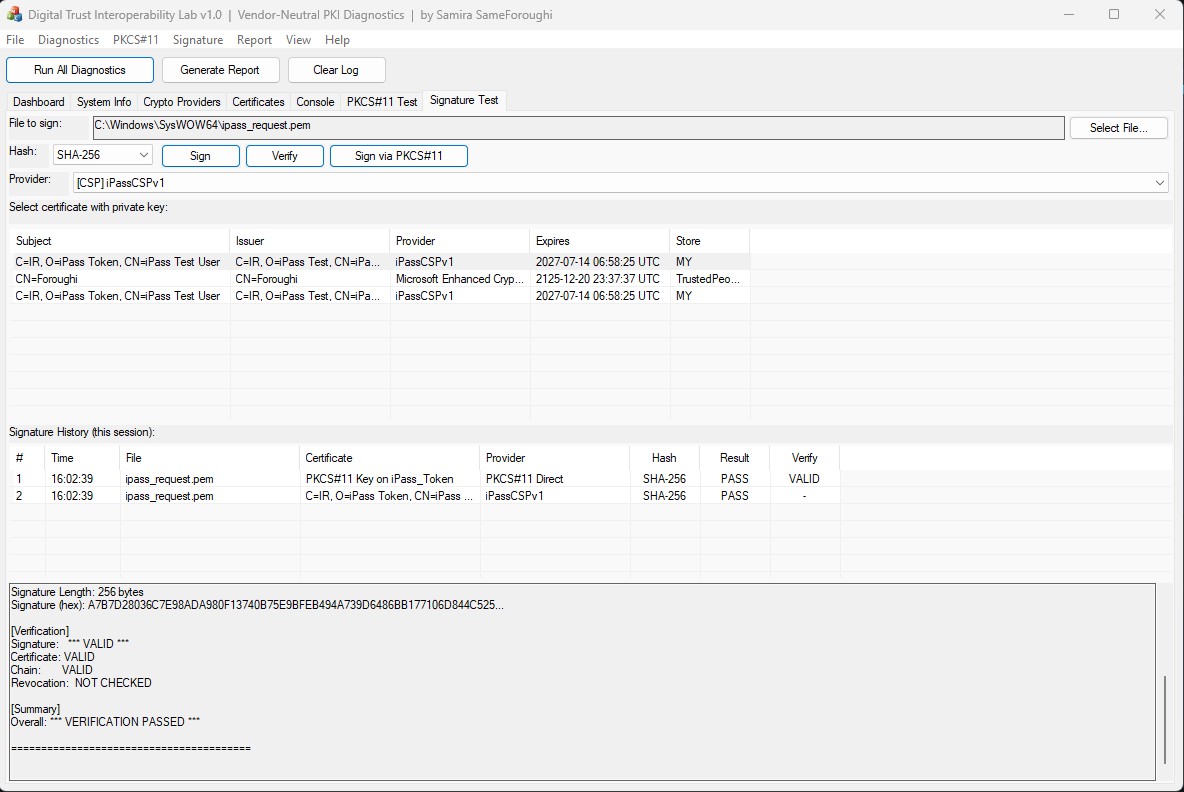
Under the documented test conditions, both paths produced byte-identical SHA-256 signature output for the same input and the same private key.
Observed result
Path A (CryptoAPI): A7B7D28036C7E98ADA980F13740B75E9BFEB494A739D6486BB177106D844C525… Path B (PKCS#11): A7B7D28036C7E98ADA980F13740B75E9BFEB494A739D6486BB177106D844C525… Comparison: ✓ BYTE-IDENTICAL
text
This is presented as an empirical cross-path consistency result for the tested token, provider configuration, signing mechanism, and input.
It is not presented as a universal proof that all implementations of CryptoAPI/CSP and PKCS#11 are equivalent.
See the Technical Whitepaper for methodology and test conditions.
Screenshots
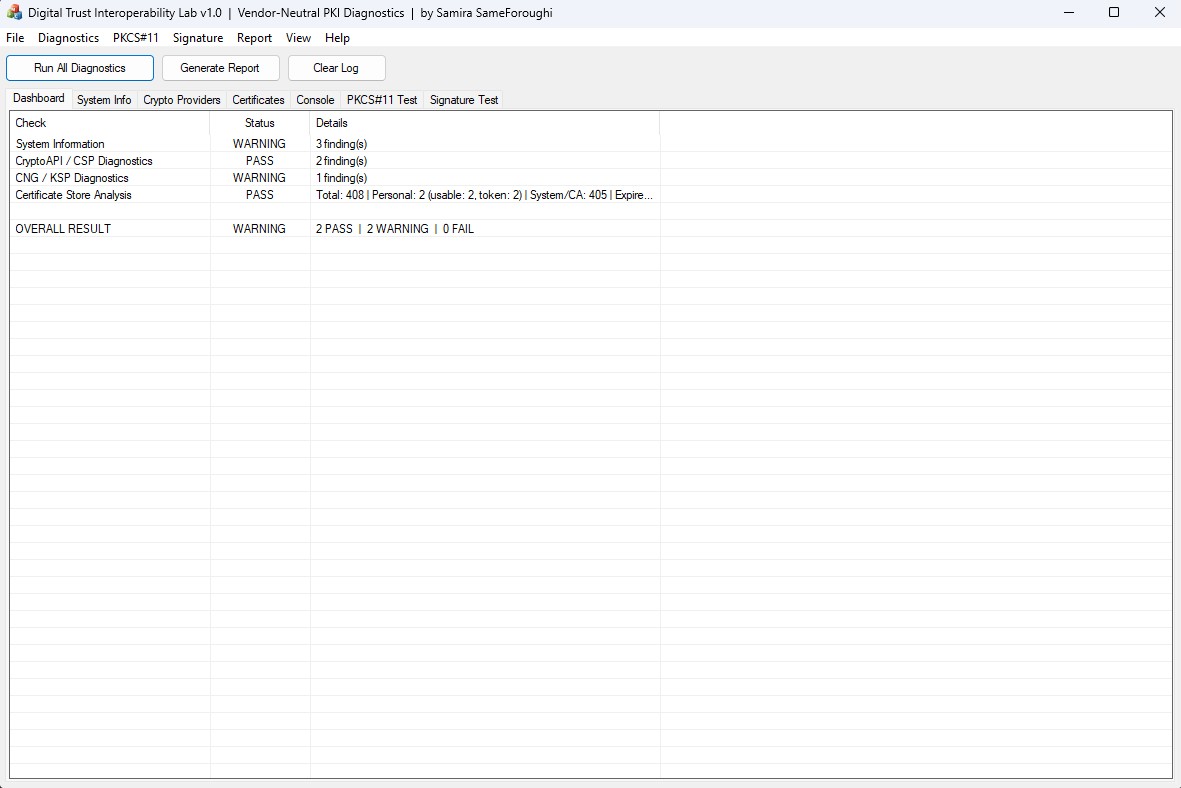
Dashboard — Full Diagnostic Run
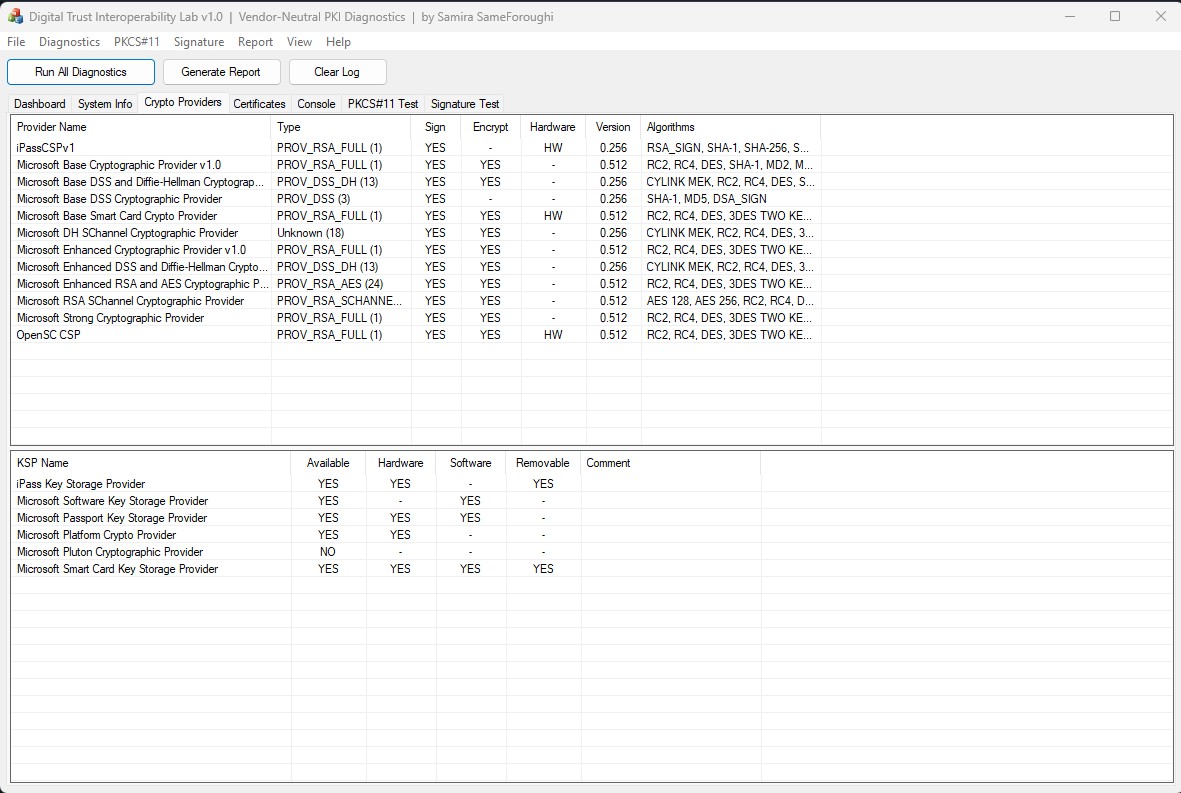
Cryptographic Provider Enumeration
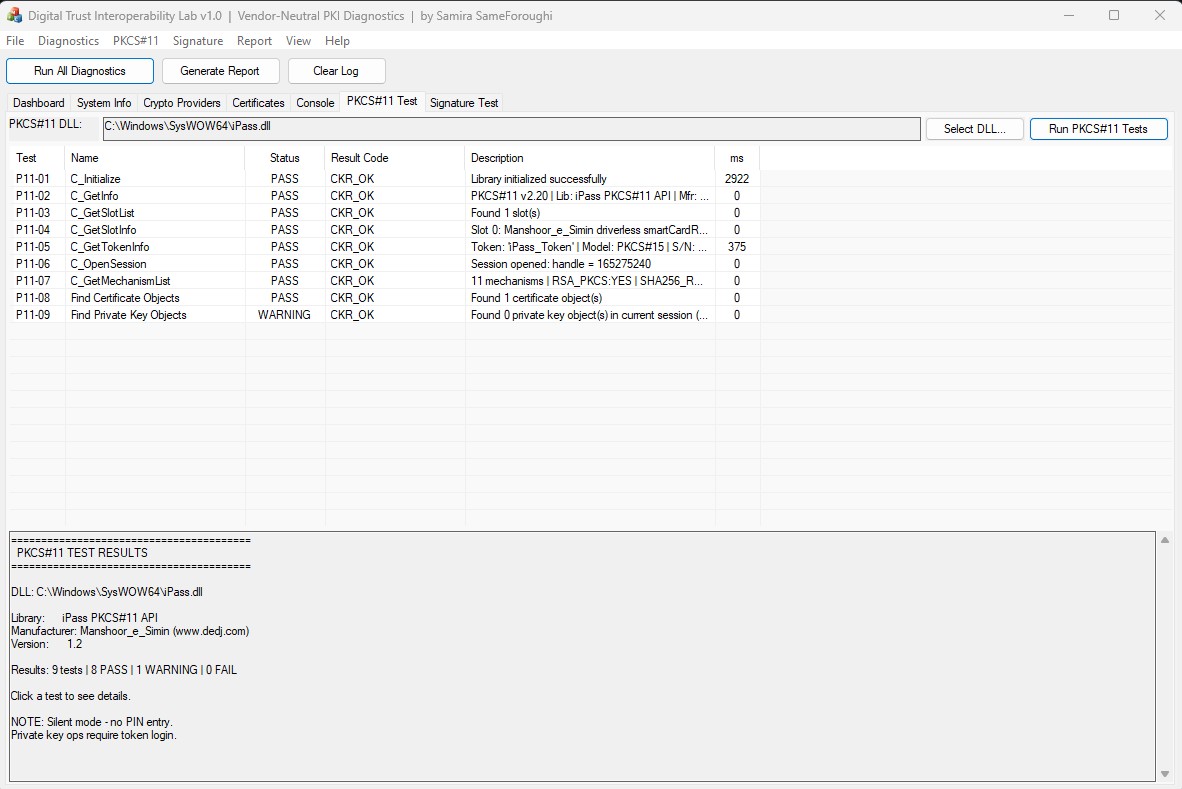
PKCS#11 Test Results
Cross-Path Signature Test
Core Capabilities
🔍 System & Environment Discovery
- Windows version, build, and architecture detection
- WOW64 detection
- Cryptographic service visibility
- Hardware token connectivity checks
- Runtime environment snapshot
🔧 Cryptographic Provider Analysis
- Legacy CSP enumeration
- Provider type and capability inspection
- Sign / encrypt capability analysis
- CNG / KSP enumeration
- Hardware / software / removable classification
- Provider capability matrix
- SHA-1 / SHA-256 / SHA-384 / SHA-512 compatibility testing
📜 Certificate Deep Inspection
- Certificate store scanning across
Current UserandLocal Machine - Subject / issuer / validity analysis
- Key usage and enhanced key usage inspection
- Private-key association analysis
- Provider binding inspection
- Chain building and validation support
The tool distinguishes states such as:
PRESENT · ABSENT · TOKEN · NO BINDING · ACCESS ERROR
🔑 PKCS#11 Dynamic Testing
- Runtime loading of vendor PKCS#11 libraries
- No compile-time dependency on a specific token library
- Standard API diagnostics including
C_Initialize,C_GetInfo,C_GetSlotList,C_GetSlotInfo,C_GetTokenInfo,C_OpenSession,C_CloseSession - Basic diagnostics can run without PIN entry
✍️ Digital Signature Testing
- Signature generation through Windows CryptoAPI
- Signature generation through PKCS#11 direct path
- SHA-1 / SHA-256 / SHA-384 / SHA-512 testing
- Public-key signature verification
- Certificate chain inspection
- Revocation-related checks where applicable
- Controlled
HP_HASHVALhandling for legacy provider compatibility testing
📊 HTML Diagnostic Reporting
- Executive summary with environment snapshot
- Provider inventory and capability matrix
- Certificate findings and PKCS#11 test results
- Signature comparison results with hex preview
- Standards / interface references
- Print-friendly HTML export
Quick Start
System Requirements
- Windows 7 or later (32-bit or 64-bit)
- Standard user privileges for core diagnostics
- Optional: PKCS#11 DLL for token testing
- Optional: Hardware token for signature testing
Installation
No installer is required. Download and run:
First Run
- Launch
DigitalTrustLab.exe - Select Run All Diagnostics
- Review the Dashboard, Cryptographic Providers, and Certificates
- For PKCS#11 testing: PKCS#11 → Select DLL → run the test suite
- For signature testing: Signature Test → select certificate and file → Sign → Verify
- Generate the HTML diagnostic report
Security & Privacy Design
| Property | Design |
|---|---|
| Local execution | Core diagnostics execute locally |
| No telemetry | No application telemetry is implemented |
| No cloud dependency | Core diagnostic functions do not require cloud services |
| Private-key protection | Private keys remain under provider / token control |
| Sensitive buffer hygiene | Relevant buffers are cleared after use where applicable |
| No key extraction | The diagnostic workflow does not export private keys |
| Portable execution | No installer is required for the distributed MVP |
The tool should be evaluated against the security requirements of the target environment before deployment in regulated or high-assurance systems.
Architecture
The application is organized around three main functional areas:
Diagnostic Engine — system discovery, provider inspection, certificate analysis
Signature Engine — CryptoAPI-based signing, PKCS#11 direct signing, cross-path output comparison, verification workflows
PKCS#11 Loader — dynamic vendor DLL loading, runtime function resolution, standard API testing
For diagrams and deeper design notes, see docs/ARCHITECTURE.md.
Standards & Interfaces
| Standard / Interface | Reference | Scope |
|---|---|---|
| X.509 | RFC 5280 | Certificate parsing and validation |
| PKCS#11 | v2.20+ | Cryptographic token interface |
| PKCS#7 / CMS | RFC 5652 | Message syntax |
| PKCS#1 | v2.1 | RSA signature structures |
| Windows CryptoAPI | Win32 | Legacy CSP integration |
| CNG / KSP | Windows Vista+ | Modern provider integration |
| FIPS 180-4 | SHA family | Hash algorithms |
| OCSP | RFC 6960 | Certificate status checking |
| CRL | RFC 5280 §5 | Revocation list processing |
The platform is built around standards-based interfaces and operating-system cryptographic APIs, while allowing vendor PKCS#11 modules to be tested dynamically.
🔬 Real-World Validation (click to expand)
The MVP has been validated against a real Windows PKI environment. **Test Environment** - **OS:** Windows 11 Enterprise, Build 26200.8875, Version 25H2 - **Hardware:** iPass USB Token - **PKCS#11:** iPass PKCS#11 API v1.2 - **CSP:** iPassCSPv1 - **KSP:** iPass Key Storage Provider **Finding 1 — Independent Token Middleware Path** During testing, the token CSP continued to perform cryptographic operations while the Windows Smart Card service was stopped, indicating the provider uses its own middleware path. **Finding 2 — Legacy Provider Hash Compatibility** 12 providers tested 7 providers did not provide the expected native SHA-256 behavior text **Finding 3 — Cross-Path Signature Consistency** The same private key and input produced byte-identical signature output through both Windows CryptoAPI / CSP and PKCS#11 direct access under the documented test conditions. Additional details are provided in the [Technical Whitepaper](/DigitalTrustInteroperabilityLab/docs/Whitepaper.pdf).
🔧 Technical Details (click to expand)
| Item | Value | |---|---| | **Language** | C / C++ | | **Compiler** | Visual C++ 2008 | | **C++ Standard** | C++03-compatible | | **Framework** | MFC / Win32 | | **Target Architecture** | x86 | | **WOW64** | Supported | | **OS Target** | Windows 7 → Windows 11 | | **Dependencies** | Win32, MFC, Windows Cryptographic APIs | | **Distribution** | Portable executable | | **Installation** | None required | The codebase intentionally avoids `auto`, `nullptr`, lambdas, and range-based `for` to preserve compatibility with legacy enterprise Windows environments.
Documentation
- 📄 Technical Whitepaper — methodology, findings, and test conditions
- 🌐 Sample HTML Report — example diagnostic output
- 📐 Standards Reference — standards and interfaces
- 🏗️ Architecture — design and component structure
- 🔧 Build Instructions — build steps
- 🛡️ Security Policy — responsible disclosure
Roadmap
- Phase 4 — PKCS#11 Deep Integration — interactive PIN entry, cross-path comparison
- Phase 5 — Deep Revocation Analysis — live OCSP, CRL validation
- Phase 6 — Timestamp Protocol — RFC 3161 generation and verification
- Phase 7 — Cross-Machine Comparison — environment diff and root-cause analysis
Global Digital Trust Awards 2026
This project has been submitted to the Global Digital Trust Awards 2026 as an engineering and research prototype demonstrating practical, vendor-neutral PKI interoperability diagnostics.
About the Author
Samira Same Foroughi — Digital Trust & PKI Engineer
Specializing in digital signatures, PKI infrastructure, cryptographic tokens, PKCS#11, Windows CSP / CNG, and hardware-backed cryptography.
- 📧 samirasameforoughi@gmail.com
- 🌐 github.com/samirasameforoughi
License
Source-Available License — see LICENSE.md for full terms.
- ✅ Personal, academic, and non-commercial diagnostic use
- ⚠️ Commercial use requires written permission